
QuickHMI Community Mode
The industrial HMI for personal projects – permanently free
QuickHMI – web-based HMI/SCADA, unlimited runtimes included. Community Mode is for everyone who wants to use it privately: the same software machine builders and system integrators use to visualize their plants – free, with no time limit and no obligation to buy.
The only condition: no commercial use.
For the PLC in your home lab
If you run an S7, TwinCAT or Allen-Bradley controller privately, you get the same drivers that run in industry: S7 via Put/Get and symbolic access (TLS-encrypted if you wish), Modbus as master and as slave, OPC UA, MQTT.
For your home energy dashboard
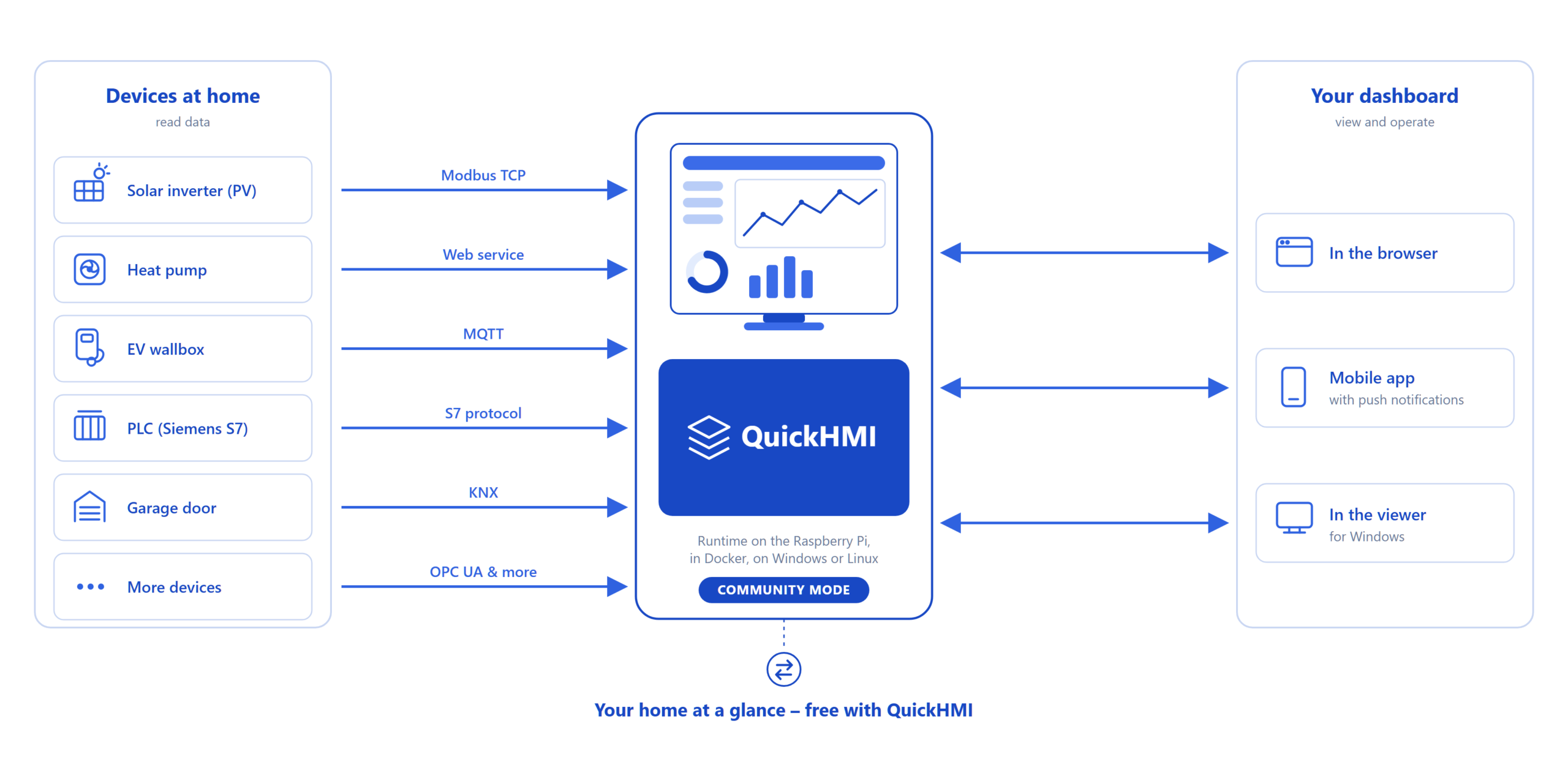
Solar inverters, heat pumps and wallboxes usually speak Modbus TCP or MQTT. With QuickHMI, that becomes a dashboard in your browser – the runtime runs on a Raspberry Pi (ready-made image) or in a Docker container. For a private home, 150 variables go a long way. By the way: KNX and BACnet are included as data sources, too.
For learning and practicing
In apprenticeship and university, working with real tools is what counts. Designing pages, setting up alarms, connecting data sources – what you build privately here, you can apply directly on the job.
What's included
- The graphical editor (Windows) and the runtime for Windows, Linux, Docker and Raspberry Pi
- Operation in the browser, in the viewer, or via the app with push notifications
- Unlimited: data sources, alarms, pages, concurrent sessions – and unlimited runtimes
- Data sources include: S7 (Put/Get, symbolic, symbolic with TLS), Modbus master/slave, TwinCAT, Allen-Bradley, OPC UA, MQTT, databases, web services, file system, KNX, BACnet – plus an open Java interface for your own data sources
- Alarm system, faceplates (templates), multi-language support, e-mail, responsive design
- AI-assisted SVG control generation (10 requests/month) and a built-in AI help bot
- Automatic updates within the current major version
Where the limits are
Compared to the commercial editions, Community Mode is deliberately reduced:
- Maximum of 150 variables
- Private, non-commercial use only
- No user management, no permission system, no recipe management
- No execution on server operating systems, no multi-instance runtime
- Major upgrades not included
- Support via the community forum, no manufacturer support
For commercial projects, there are the Standard, Ultimate and Enterprise Editions – all differences are shown in the Feature Overview.
How to get started
- Download QuickHMI → Download
- Explore the full feature set during the trial period
- After the trial, activate Community Mode – done
Questions and community: our community forum.